Function Description
| Category | Description |
|---|---|
| Function Syntax | RIGHT(text,num_chars) |
| Function | Returns characters of the specified length from the right side of a string. |
| Parameters | text: a string num_chars: the number of characters to return |
| Number of Parameters | 2 |
| Parameter Types | Text, number |
| Return Value Type | Text |
| Notes | The value**** of num_chars cannot be less than 0. If its value is greater than the length of the text string, the RIGHT function returns the entire text. If its value is not specified, the default value is 1. |
The following table provides simple formula examples.
| Formula | Result |
|---|---|
RIGHT("Itisinteresting",6) | esting |
RIGHT("ShareHolder") | r |
RIGHT("Hugesale",4) | sale |
Example
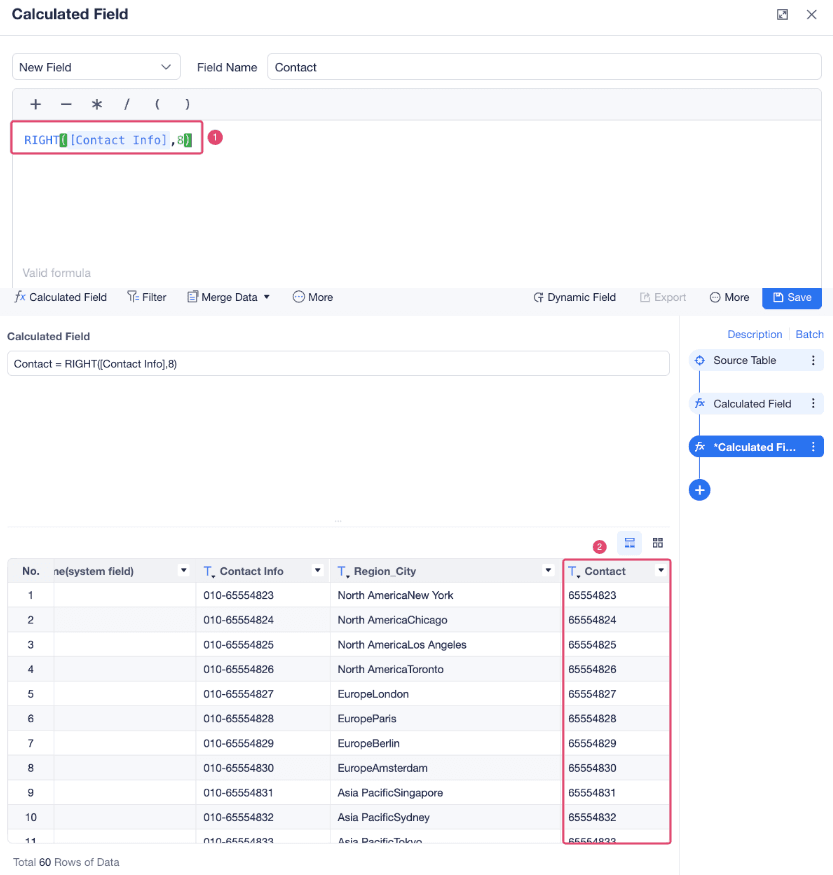
If the value of the Contact Info field is in the format 010-65554822 and you want to extract the last eight digits to create a field named Contact, use the formula RIGHT([Contact Info],8), as shown in the following figure.