


Function Description
| Category | Description |
|---|---|
| Function Syntax | LEFT(text,num_chars) |
| Function | Returns the first character or characters in a text string based on the specified number of characters. |
| Parameters | text: the text that contains the characters to extract num_chars: the number of characters to return |
| Number of Parameters | 2 |
| Parameter Types | Text, number |
| Return Value Type | Text |
| Notes | The value of num_chars must be greater than or equal to 0. If its value is greater than the length of the text, the LEFT function returns all text. If its value is omitted, the default value is 1. |
The following table provides simple formula examples.
| Formula | Result |
|---|---|
LEFT("Fine software",8) | Fine sof |
LEFT("Finesoftware") | F |
Example
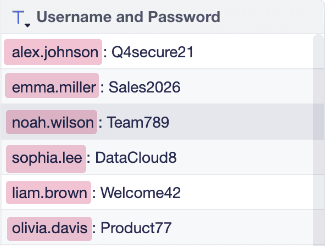
- The field value records a user account and password. You want to extract the user account on the left side of
:.
- You can use the FIND function together with LEFT. Use the formula
LEFT([Username and Password],FIND(" : ",[Username and Password])-1)to extract the user account on the left side, as shown in the following figure.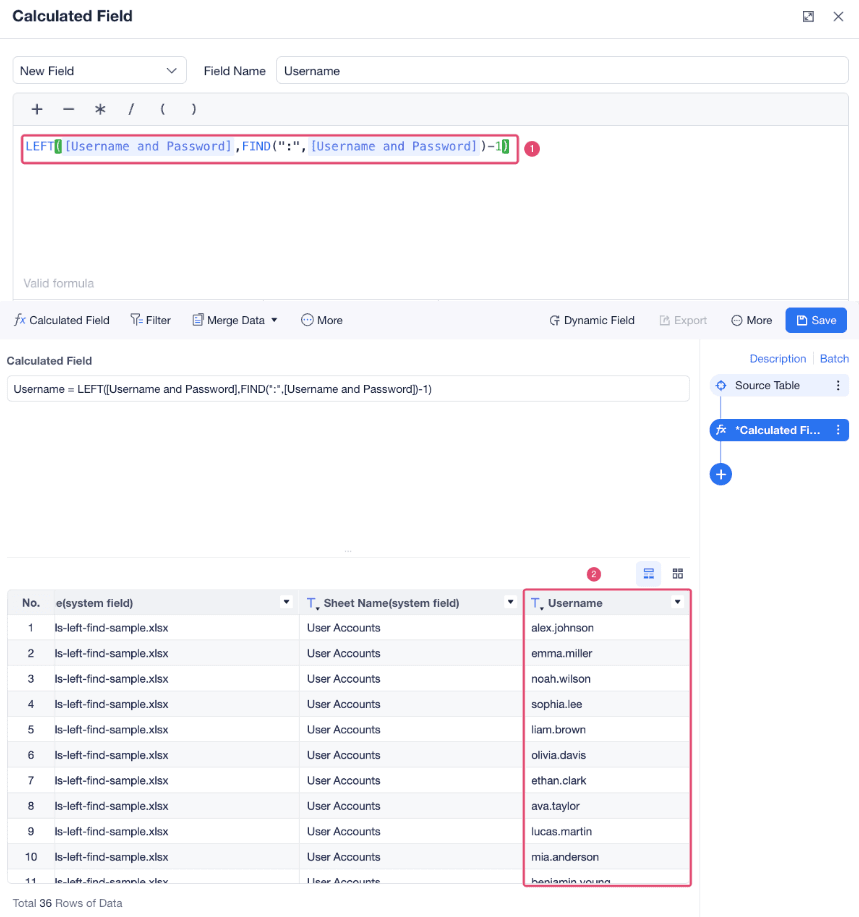 Formula description:
| Formula | Description |
|---|---|
FIND(":",[User Account and Password]) | Finds the position of : in the User Account and Password field. |
LEFT([User Account and Password],FIND(":",[User Account and Password])-1) | Extracts characters in the field from left to right. The number of extracted characters is the position of : found by the FIND function minus 1, which returns the characters before :. |