Function Description
| Category | Description |
|---|---|
| Syntax | CEILING(number,significance) |
| Function | Rounds a number up to the nearest multiple of the significance value. |
| Parameters | number: (required) the value to round up significance: (required) the multiple to which the value is rounded |
| Number of Parameters | 2 |
| Parameter Type | Number |
| Return Value Type | Number |
| Notes | 1. If any parameter is nonnumeric, CEILING returns the #VALUE! error.2. Regardless of the sign of the number value, the result is always a multiple of the significance value. If the number value is already a multiple of the significance value, the number value is returned unchanged. If the number value is not a multiple of the significance value: a. the significance value is positive, and the number value is negative, the value is rounded up toward 0, and the result is greater than the number value.b. If the significance value is positive and the number value is positive, the value is rounded up away from 0, and the result is greater than the number value.c. If the significance value is negative and the number value is also negative, the value is rounded down away from 0, and the result is less than the number value.d. If the significance value is negative and the number value is positive, CEILING returns the #NUM! error. |
Examples
| Formula | Result |
|---|---|
CEILING(2.5,1) | 3 |
CEILING(-2.5,-2) | -4 |
CEILING(-2.5,2) | -2 |
CEILING(1.5,0.1) | 1.5 |
CEILING(0.234,0.01) | 0.24 |
More Examples
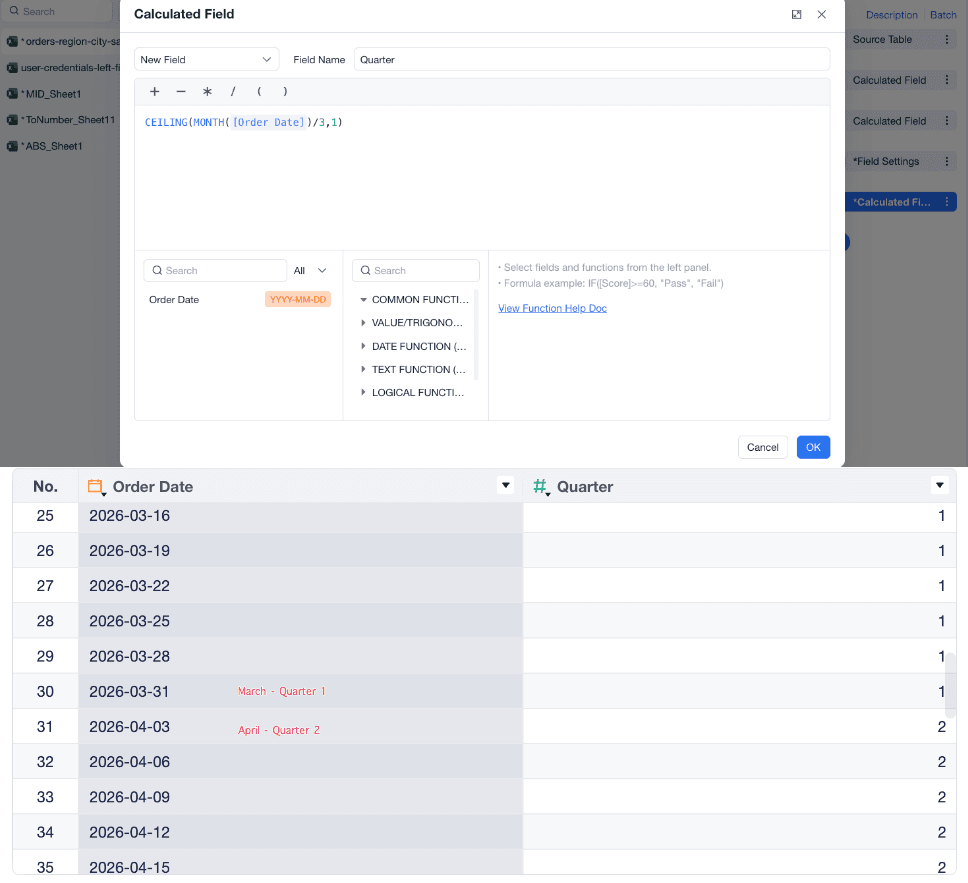
You can use CEILING to calculate the quarter for a date. For example, if the date is 2026-03-31, use CEILING(MONTH([Order Date])/3,1) to get the month and round it up to the quarter number.