Function Description
| Category | Description |
|---|---|
| Function Syntax | REPLACE(old_text,start_num,num_chars,new_text) |
| Function | Replaces part of a text string with another text string based on the specified number of characters. |
| Parameters | old_text: the text or cell reference whose characters need to be replaced start_num: the start position in old_text where new_text replaces characters num_chars: the number of characters in old_text to replace with new_text new_text: the text used to replace part of the old text |
| Number of Parameters | 4 |
| Parameter Types | Text, number, number, text |
| Return Value Type | Text |
The following table provides simple formula examples.
| Formula | Result |
|---|---|
REPLACE("0123456789",5,4,"*") | 0123*89 |
REPLACE("1980",3,2,"99") | 1999 |
Example
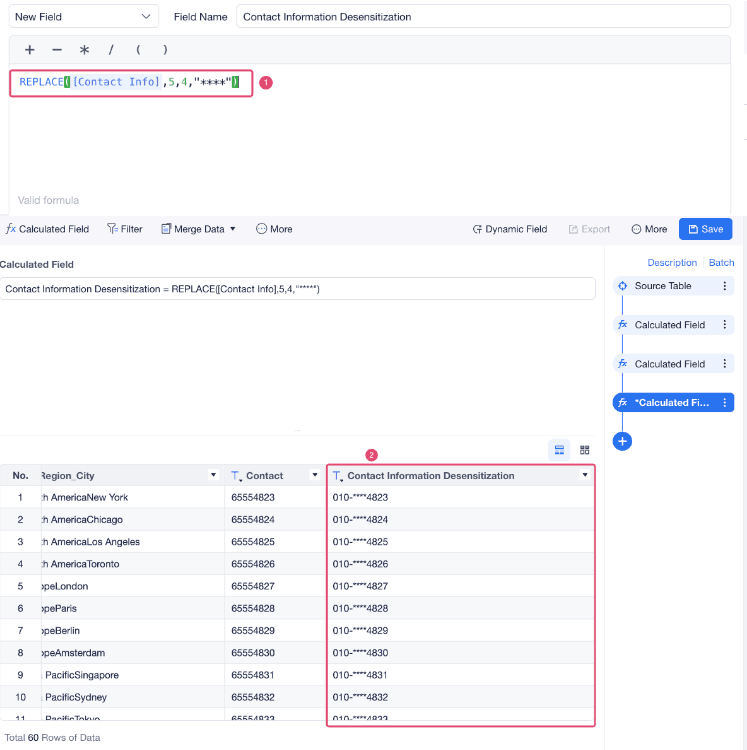
You can use the REPLACE function to mask mobile phone numbers, as shown in the following figure.