Function Description
| Category | Description |
|---|---|
| Syntax | DATESUBDATE(end_date,start_date,unit) |
| Function | Returns the time difference between two specified dates. |
| Parameters | end_date: the end date value of the specified period Only date or datetime values are supported. start_date: the start date value of the specified period Only date or datetime values are supported. unit: the unit value that determines how the result is returned. - "s" or "S": returns the difference in seconds- "m" or "M": returns the difference in minutes- "h" or "H": returns the difference in hours- "d" or "D": returns the difference in days- "w" or "W": returns the difference in weeks |
| Number of Parameters | 3 |
| Parameter Type | end_date: date or datetime start_date: date or datetime unit: text |
| Return Value Type | Number |
Examples
| Formula | Result |
|---|---|
DATESUBDATE(DATE(2008,8,8),DATE(2008,6,6),"h") | 1512 The time difference between August 8, 2008 and June 6, 2008 is 1512 hours. |
DATESUBDATE(DATE(2008,8,2),DATE(2008,8,8),"d") | -6 The time difference between August 2, 2008 and August 8, 2008 is -6 days. |
More Examples
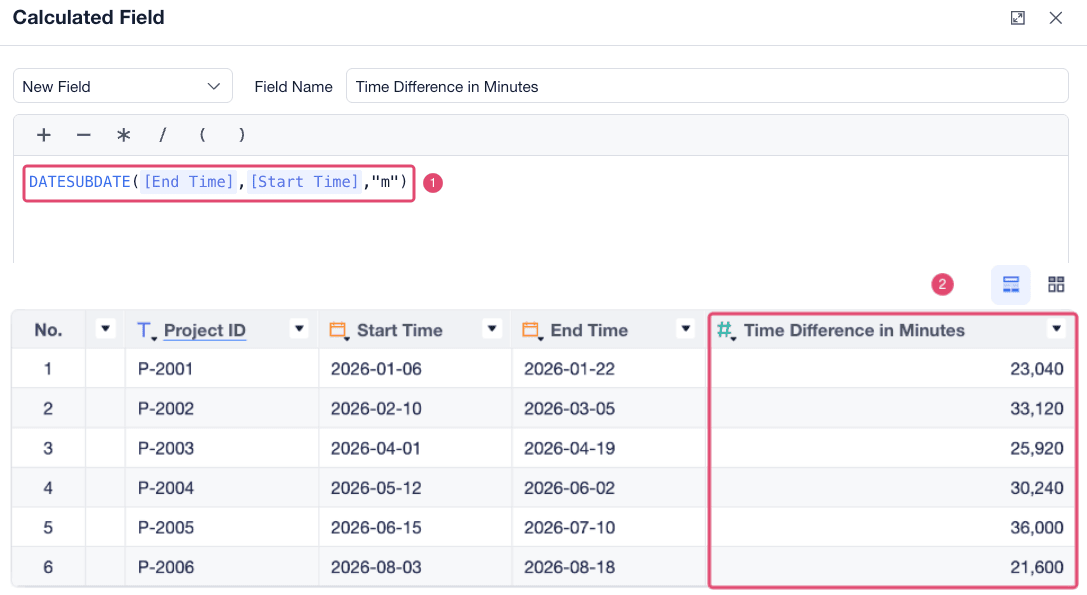
For example, you can use DATESUBDATE([End Time],[Start Time],"m") to calculate the difference in minutes between the order start time and completion time.